

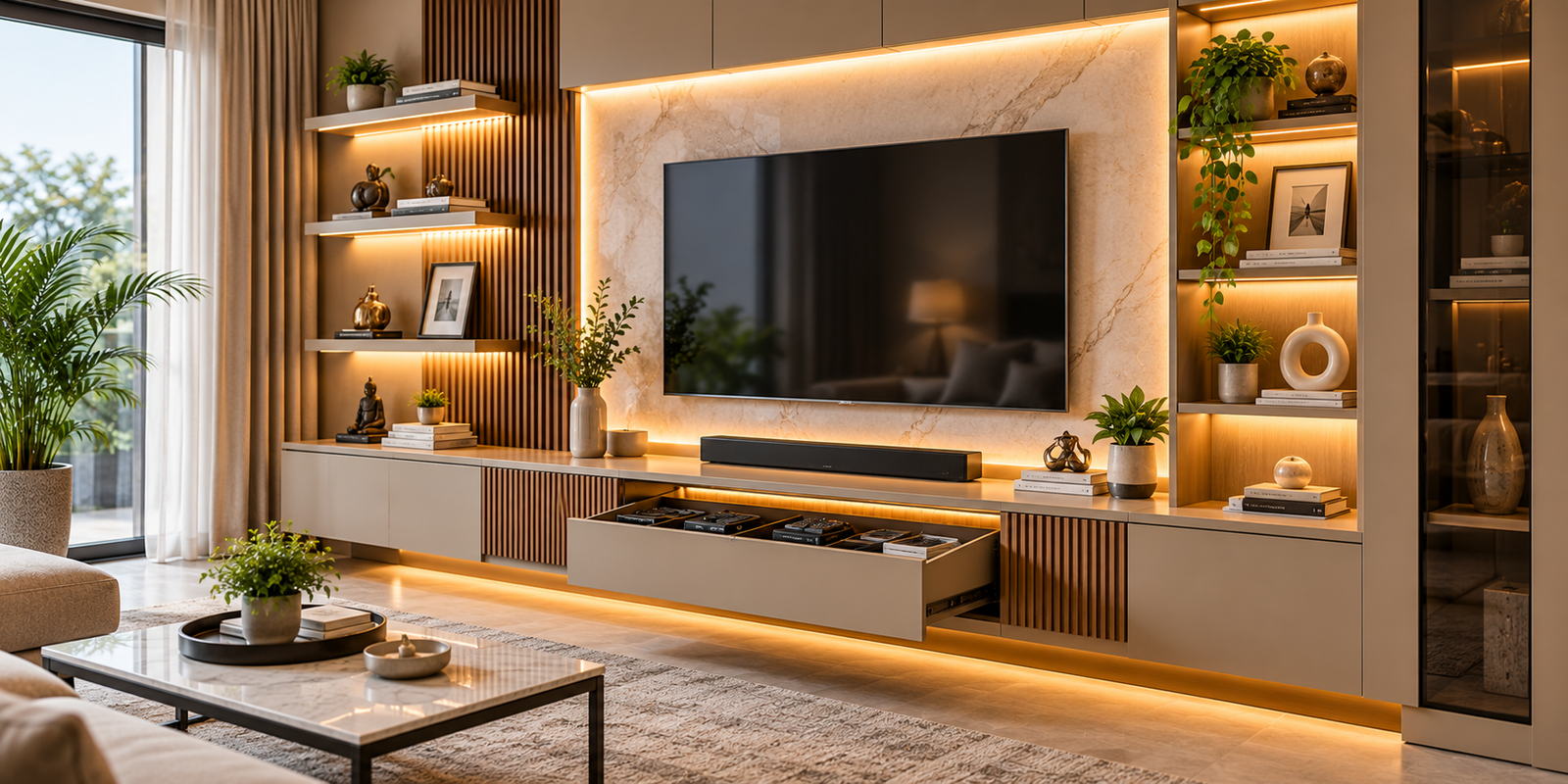
Introduction: Why Entertainment Unit Design Matters
The entertainment unit has become an important feature of modern living rooms. Beyond providing a place for the television, it can organise electronic equipment, conceal cables, display books and decorative objects, and establish a visual focal point for the entire room.
In contemporary homes, entertainment units may range from simple floating shelves to full-width media walls incorporating cabinets, display niches, integrated lighting, and decorative wall panels. The appropriate design depends on the room’s dimensions, the television size, the household’s viewing habits, and the equipment that needs to be accommodated.
However, an attractive TV wall is not necessarily a practical one. Poor screen positioning can cause discomfort, inadequate ventilation can affect electronic equipment, and insufficient cable planning can leave visible wires across an otherwise carefully designed interior.
A well-planned entertainment unit considers these details before selecting finishes or decorative features. It balances visual appeal with accessibility, safe equipment placement, storage capacity, and ease of maintenance.
Whether you are furnishing a new apartment or renovating an existing living room, understanding these design principles can help you create a media area that is organised, comfortable, and suited to everyday use.
1. Assess Your Entertainment Needs Before Choosing a Design
The first step in designing an entertainment unit is identifying the equipment and activities it must support.
A household that primarily streams films may need space for a television, streaming device, and soundbar. A household that enjoys gaming may also need room for a console, controllers, charging accessories, and game storage.
Some homes require space for speakers, a set-top box, a home theatre receiver, a router, or additional media devices. Others may prioritise decorative displays and concealed storage.
Before finalising the design, prepare a list of the equipment you intend to use.
Consider the following questions:
- What is the size and weight of the television?
- Will the television stand on the cabinet or be mounted on the wall?
- Will you use a soundbar, external speakers, or a home theatre system?
- Which streaming devices, consoles, or set-top boxes need storage?
- Do any devices require remote-control visibility?
- How many power outlets and connection points will be needed?
- Will you display books, photographs, collectibles, or decorative objects?
- Is the entertainment unit intended to conceal most belongings or showcase selected items?
These answers influence the cabinet dimensions, shelf spacing, cable routes, ventilation provisions, and lighting arrangement.
It is also useful to consider future upgrades. A cabinet designed around one small device may become inconvenient if the household later adds a gaming console or larger audio equipment.
Planning for realistic future needs can reduce the need for modifications after installation.
2. Choose the Right Entertainment Unit Layout
The room’s dimensions, seating arrangement, windows, doors, and circulation paths determine which entertainment unit layout will work best.
Floating TV Units
Floating TV units are mounted above the floor, creating a lighter visual appearance and leaving the floor beneath them visible.
They can work well in contemporary living rooms, especially when paired with concealed cable routes and a wall-mounted television.
However, the supporting wall and mounting system must be suitable for the combined load. The cabinet’s construction, fixing points, and stored equipment should be considered before installation.
Floating units also require sufficient clearance for cleaning and access to any equipment stored inside.
Floor-Mounted Entertainment Units
Floor-mounted units rest on the floor and can provide substantial storage for media equipment, books, games, and other living room essentials.
They may be more suitable when the design requires multiple drawers or larger storage compartments.
Their dimensions should be coordinated with the television height and the available wall space. An oversized cabinet can make a compact room feel crowded, while a unit that is too small may not provide adequate storage.
Full-Wall Media Units
A full-wall entertainment unit combines several elements, potentially including a television panel, cabinets, display shelves, and decorative finishes.
This approach can create a unified architectural feature in a larger living room.
The design should maintain a balance between open and closed storage. Too many shelves can make the wall visually busy, while excessive closed cabinetry may create a heavy appearance.
Electrical access, equipment ventilation, and future maintenance should be incorporated into the layout from the beginning.
Corner Entertainment Units
Corner units can be useful in certain room arrangements where the television cannot comfortably occupy the main wall.
However, viewing angles, seating positions, glare, and speaker placement should be evaluated carefully. A corner arrangement that saves space but forces viewers to turn their heads uncomfortably may not be the best solution.
The most effective layout is the one that supports comfortable viewing and convenient equipment access while fitting naturally into the room.
3. Plan Television Height and Viewing Distance
Television placement influences viewing comfort and should be considered before the entertainment unit is manufactured.
Determine a Comfortable Screen Height
For many seating arrangements, positioning the centre of the screen approximately at seated eye level is a useful starting point.
The ideal height depends on the television size, sofa height, viewing posture, and whether the screen is tilted. Mounting the television too high can encourage viewers to look upward for extended periods.
If the television is mounted above a fireplace or another architectural feature, consider whether the resulting height remains comfortable for regular viewing.
Consider Viewing Distance
Viewing distance depends on screen size, resolution, personal preference, and the type of content watched.
A larger screen can support a more immersive experience, but it should be selected according to the room’s dimensions and the distance between the television and seating area.
Before fixing the screen position, arrange the sofa or primary seating and test the intended viewing angle.
Avoid Glare and Reflections
Windows, glossy wall panels, mirrors, and bright light fixtures can reflect across the screen.
Where possible, position the television so that direct sunlight does not fall onto the viewing surface. Curtains or blinds can help manage daylight when the room arrangement cannot be changed.
Test the viewing position at different times of day because natural light changes considerably.
Plan Wall Mounting Carefully
A wall-mounted television requires an appropriate bracket and suitable support. Confirm the television’s mounting specifications, weight, wall construction, and the location of any concealed services before drilling.
Leave adequate access for power connections and signal cables. The design should not make routine maintenance unnecessarily difficult.
4. Essential Entertainment Unit Accessories for a Better Organised Living Room
Entertainment unit accessories help manage everyday items, conceal visual clutter, and improve the usability of a media wall.
Their selection should reflect the equipment being used, the amount of storage required, and the overall design of the living room.
4.1 Soft-Close Drawers: Organising Remotes, Games and Living Room Essentials
Soft-close drawers use a mechanism that slows the drawer during its final closing movement, helping reduce sudden impacts and noise.
In an entertainment unit, these drawers can accommodate television remotes, gaming controllers, charging cables, batteries, instruction manuals, headphones, and other small accessories.
Without designated storage, these items often accumulate on the coffee table or become mixed together in larger cabinets.
A well-organised drawer can assign separate compartments to different categories. One section might hold remotes, another could accommodate gaming accessories, and a third might store spare cables or manuals.
Drawer dimensions should reflect the equipment being stored. Gaming controllers and headphones may require more space than small remote controls, while larger drawers can accommodate game cases or accessories.
Check the drawer runner quality, load capacity, extension length, and compatibility with the cabinet. Frequently used drawers should open fully without hitting the sofa, nearby furniture, or another cabinet door.
Soft-close mechanisms improve convenience but should not be overloaded. Keep liquids away from electronic accessories and store batteries according to the manufacturer’s recommendations.
The objective is to give small belongings a consistent place so they can be found quickly without cluttering the living room.
4.2 Concealed Storage Cabinets: Keeping the Media Area Visually Clean
Concealed storage cabinets provide enclosed space for items that do not need to remain on display.
They can accommodate gaming equipment, spare cables, manuals, board games, accessories, and other living room belongings while maintaining a more streamlined appearance.
This is particularly useful in open-plan homes, where the entertainment wall is visible from dining areas, kitchens, or entryways.
The cabinet’s internal dimensions should be planned around the equipment it will hold. Large devices may require more height or depth than decorative objects, while frequently used accessories benefit from easy access.
Ventilation is an important consideration. Electronic equipment can generate heat, so a closed cabinet should not restrict airflow beyond the device manufacturer’s requirements. Where ventilation openings or other cooling provisions are needed, they should be incorporated into the design.
Remote-control operation also needs attention. Some equipment uses infrared signals that may not pass through solid cabinet doors. In such cases, consider a suitable open shelf, compatible signal solution, or alternative equipment arrangement.
Power connections should remain accessible, and cables should not be compressed behind stored devices.
Concealed cabinets are most effective when they hide visual clutter without making the equipment difficult to use, cool, or maintain.
4.3 Open Display Shelves: Showcasing Books and Personal Objects
Open display shelves create space for books, photographs, collectibles, artwork, plants, and carefully selected decorative objects.
They can introduce personality into an entertainment unit and break up the appearance of a large television panel or continuous cabinet wall.
The number, depth, spacing, and arrangement of the shelves should reflect the items being displayed.
Heavy objects require appropriately supported shelves, while delicate pieces should be positioned where they are unlikely to be knocked over during everyday movement.
A balanced display usually combines objects of different heights without filling every available space. Leaving some areas open allows individual pieces to stand out and reduces visual clutter.
Open shelves collect dust and may require more frequent cleaning than enclosed cabinets. Items should therefore be selected with maintenance in mind.
If books or collectibles are particularly valuable, consider their sensitivity to direct sunlight, heat, and environmental conditions.
Integrated lighting can highlight selected objects, but it should be positioned to avoid distracting reflections on the television screen.
Open display shelves work best when combined with concealed storage, allowing decorative objects to remain visible while less attractive or frequently handled belongings stay organised behind doors.
4.4 Cable Management: Concealing Wires Without Compromising Access
Cable management is one of the most important technical considerations in entertainment unit design.
Televisions, streaming devices, gaming consoles, speakers, routers, and other equipment may require multiple power and signal cables. Without a planned routing system, wires can become tangled, visible, difficult to clean, or vulnerable to accidental pulling.
A cable management plan should be created before the wall panels and cabinets are installed.
Identify the location of each device, the required connections, and the route each cable will follow. Suitable solutions may include cable channels, grommets, concealed conduits, cabinet openings, and dedicated cable trays.
Avoid routing cables through spaces where drawers, hinges, or moving brackets can pinch them. Allow appropriate slack for equipment movement and servicing without leaving loose loops that create hazards.
Do not overcrowd cable channels or restrict airflow around power supplies and electronic equipment. Follow manufacturer instructions and applicable electrical safety requirements.
Power outlets should be accessible for maintenance. Any new electrical work or concealed wiring should be completed by a qualified professional in accordance with local requirements.
It is also wise to label cables at both ends when several similar connections are used. This makes troubleshooting and equipment replacement easier.
Good cable management improves the appearance of the entertainment unit while helping keep connections organised and accessible.
4.5 Floating Shelves: Creating a Lighter and More Flexible Display
Floating shelves provide display or storage space without the visual bulk of a conventional cabinet or prominent supporting brackets.
They can be positioned above or beside the television to accommodate small speakers, books, photographs, and decorative objects.
Their suitability depends on the shelf depth, wall construction, mounting system, and expected load.
Before installation, determine what each shelf will hold. Decorative objects may impose relatively little weight, while books, audio equipment, and larger objects require stronger support.
Floating shelves should not be treated as universally suitable for heavy equipment simply because their mounting hardware is concealed.
The shelf arrangement should also respect the television’s proportions. Excessive shelving around the screen can make the wall feel crowded, while widely spaced shelves may create a more open appearance.
Consider cable routing for any electronic device placed on a floating shelf. Visible power wires can undermine the clean appearance the design is intended to achieve.
Floating shelves are especially useful when homeowners want some display space without committing to a full-wall cabinet arrangement.
4.6 Media Device Storage: Giving Electronic Equipment a Dedicated Place
Media device storage provides a planned location for streaming boxes, set-top boxes, gaming consoles, media players, routers, and audio equipment.
Different devices have different space and ventilation requirements, so the internal cabinet should be designed around the actual equipment rather than a generic compartment size.
Begin by measuring the devices, including their cables and any accessories that need to remain connected.
Check whether the equipment needs an open front for infrared remotes, airflow openings, or additional clearance around ventilation points. Gaming consoles and audio receivers can generate significant heat during operation, making ventilation particularly important.
Avoid stacking devices in ways that obstruct cooling or place unnecessary weight on equipment that is not designed to support it.
The storage arrangement should also permit convenient access to USB ports, controls, discs, memory cards, and other frequently used connections.
If the household regularly upgrades its equipment, adjustable shelving or a slightly flexible cabinet arrangement may be more practical than tightly fitted compartments.
Power connections and cable routes should be coordinated with the furniture design. Leave sufficient room for plugs and connectors without forcing the cabinet to sit away from the wall or compressing cables.
A dedicated media storage section keeps equipment organised while supporting reliable operation and easier maintenance.
4.7 Back Panel Lighting: Adding Depth to the TV Wall
Back panel lighting introduces illumination behind or around the television panel, creating a subtle visual separation between the screen and the surrounding wall.
It can help a media wall feel more layered, particularly when combined with wood finishes, textured panels, or a restrained neutral colour palette.
The lighting may be installed behind a panel, around its edges, or within carefully designed recesses. The effect depends on the distance between the light source and the wall, the diffusion method, and the brightness selected.
Avoid lighting arrangements that create visible hotspots or distracting reflections on the television screen.
For comfortable viewing, the ambient light should remain appropriate for the room and the content being watched. Extremely bright accent lighting can compete with the screen rather than complement it.
The colour temperature should also coordinate with the surrounding interior. Warm lighting can complement wood and beige finishes, while other tones may suit different design schemes.
Before installation, plan the power supply, switch location, dimming requirements, and access to the lighting driver.
Back panel lighting should be considered an accent feature rather than the only source of illumination in the living room.
When used carefully, it adds depth to the entertainment wall without requiring excessive decoration.
4.8 Decorative Wall Panels: Creating a Distinctive Media Wall
Decorative wall panels can transform the area surrounding a television into a coordinated architectural feature.
Common design approaches include wood-inspired panels, vertical slats, textured surfaces, stone-look finishes, and combinations of contrasting materials.
The panel choice should complement the television, storage cabinets, flooring, and surrounding furniture.
Large uninterrupted panels can create a minimalist appearance, while carefully positioned textures or contrasting finishes can add visual interest.
However, the panel should not overwhelm the room. In a compact living room, a heavy combination of dark colours, dense textures, and oversized cabinetry may make the space feel smaller.
Material selection should consider durability, cleaning requirements, installation method, and suitability for the intended location.
The panel construction must also account for television mounting and access to electrical connections. If the television is mounted through or in front of the panel, the supporting structure must be designed to handle the required load rather than relying on decorative cladding alone.
Cable access and future servicing should be planned before the panels are fixed. A beautifully finished wall becomes inconvenient if replacing a cable requires dismantling a large section.
Decorative wall panels are most successful when they complement the room’s proportions and improve the organisation of the media area without sacrificing accessibility.
5. Plan Lighting Around the Television and Seating Area
Lighting affects both the appearance of an entertainment unit and the comfort of people watching television.
A well-designed living room usually combines general room lighting with selected accent lighting, while allowing brightness to be adjusted according to the activity.
General Room Lighting
Ceiling lights provide overall illumination for movement, conversation, and everyday living.
Their placement should minimise glare on the television and avoid creating strong reflections across the screen.
Accent Lighting
Back panel lighting, display shelf lighting, and selected decorative fixtures can add depth to the entertainment wall.
Use these features selectively so that the television remains the main viewing focus.
Screen Reflections
Glossy panels, mirrors, windows, and exposed light sources can reflect across the television screen.
Test the seating position and screen visibility at different times of day before finalising the arrangement.
Lighting Controls
Separate controls or dimming options can make it easier to adjust the room for watching films, entertaining guests, or carrying out other activities.
Integrated lighting systems should be planned with accessible wiring, suitable power supplies, and provisions for future maintenance.
6. Choose Materials That Suit Your Living Room
The entertainment unit’s materials influence its appearance, durability, maintenance requirements, and integration with other furniture.
Laminate Finishes
Laminate finishes offer a wide selection of colours, textures, and wood-inspired patterns. They can be suitable for contemporary interiors and coordinated media walls.
Consider the specific product’s surface properties, edge finishing, and cleaning requirements rather than assuming that every laminate performs identically.
Wood and Wood-Inspired Finishes
Wood-inspired finishes can add warmth and complement neutral or natural interior palettes.
Their colour and grain pattern should be coordinated with flooring, coffee tables, and other nearby furniture to avoid unnecessary visual competition.
Matte and Glossy Surfaces
Matte finishes can create a restrained appearance, while glossy surfaces may reflect more light and produce a sleek effect.
Fingerprints, dust, and surface marks may be more noticeable on some finishes than others, so maintenance preferences should influence the choice.
Stone-Look and Textured Panels
Stone-look surfaces and textured panels can introduce contrast and create a feature wall around the television.
Consider their weight, installation requirements, joint details, and suitability for the supporting structure.
Regardless of the selected finish, ensure that cabinet construction, hardware, and mounting details are appropriate for the intended loads and equipment.
7. Make a Small Living Room Feel More Spacious
A compact living room benefits from an entertainment unit that provides essential storage without dominating the available wall.
Floating cabinets can create a lighter visual impression, while a limited material palette can help the media wall feel integrated with the rest of the room.
Wall-mounted televisions can free up cabinet surface area, but the mounting height should remain comfortable for viewing.
Use closed storage for small accessories, cables, and equipment that does not need to remain visible. Reserve open shelves for a limited number of carefully selected objects.
Avoid installing a cabinet that is deeper or wider than necessary. Its dimensions should be based on the actual equipment, storage needs, and proportions of the wall.
Lighting can help create depth, but excessive accent strips or brightly illuminated shelves may make a compact room feel busy.
Consider the sofa position and walking paths before deciding how far the unit should project into the room.
The most useful small-space design is one that keeps equipment organised, preserves circulation, and provides a comfortable viewing arrangement.
8. Common Entertainment Unit Design Mistakes to Avoid
Mounting the television too high: The screen should be positioned according to the seating arrangement and viewing comfort.
Ignoring ventilation: Electronic devices require suitable airflow and should not be enclosed in compartments that restrict cooling.
Planning cables too late: Concealed wiring and power access should be coordinated before cabinets and wall panels are installed.
Using undersized storage compartments: Equipment dimensions, cables, plugs, and ventilation clearance should all be considered.
Overloading floating shelves: Concealed brackets do not eliminate the need for suitable structural support and load limits.
Adding excessive decoration: Too many materials, shelves, and display objects can make the media wall visually crowded.
Ignoring screen glare: Windows, mirrors, and lighting fixtures should be considered when selecting the television position.
Blocking remote-control signals: Some devices need a clear infrared path unless a suitable alternative arrangement is provided.
Making maintenance difficult: Cable connections, power supplies, lighting drivers, and media equipment should remain accessible.
Choosing finishes without considering upkeep: Reflective or textured surfaces may require different cleaning routines.
Forgetting future upgrades: A unit should accommodate realistic changes in equipment where practical.
Neglecting wall support: Television brackets and heavy cabinets must be fixed to suitable supporting structures.
Addressing these details during planning can improve viewing comfort, equipment reliability, and the long-term usability of the entertainment unit.
9. How to Budget for an Entertainment Unit
The budget depends on the cabinet dimensions, materials, storage configuration, wall treatment, lighting, hardware, and installation requirements.
A complete estimate may include the television cabinet, wall panels, floating shelves, concealed storage, drawers, cable management, lighting, equipment ventilation provisions, and mounting hardware.
Electrical work, concealed conduits, wall preparation, and modifications to existing connections may require separate allowances.
Request a detailed quotation that identifies the materials, finishes, hardware specifications, lighting components, mounting provisions, and installation inclusions.
Compare quotations on an equivalent scope of work. A simple TV cabinet should not be compared directly with a full-wall installation that includes integrated lighting and decorative panels.
Prioritise features according to their functional value. Cable management, adequate equipment ventilation, accessible storage, and comfortable television placement should generally be addressed before optional decorative details.
It is also sensible to reserve some budget for unexpected site conditions and future servicing.
A well-planned entertainment unit does not need to include every available feature. The most effective design is one that meets the household’s needs while remaining comfortable to use and maintain.
10. A Checklist Before Finalising Your Entertainment Unit
Before approving the final design, review the following points:
- Measure the wall and confirm the available floor space.
- Verify the television’s dimensions, weight, and mounting specifications.
- Position the main seating and test the intended viewing angle.
- Check screen height, viewing distance, and potential glare.
- List the media equipment and accessories that require storage.
- Confirm cabinet dimensions and ventilation requirements.
- Plan cable routes, power outlets, and connection access.
- Ensure that remote-control signals can reach the relevant equipment.
- Check the load capacity of shelves and wall-mounted components.
- Select durable finishes that complement the living room.
- Plan general lighting, display lighting, and back panel lighting.
- Ensure that lighting drivers and electronic connections remain accessible.
- Review drawer movement and clearance from nearby furniture.
- Obtain a detailed quotation and written warranty information.
- Review the final drawings before manufacturing begins.
- Inspect mounting stability, cable concealment, lighting, and finish quality before handover.
This checklist helps ensure that the entertainment unit functions as a complete media and storage system rather than simply a decorative TV wall.
Conclusion: A Better Entertainment Unit Starts With Practical Planning
A well-designed entertainment unit combines comfortable television placement, organised media storage, effective cable management, appropriate lighting, and durable materials.
Accessories such as soft-close drawers, concealed storage cabinets, open display shelves, cable management systems, floating shelves, media device storage, back panel lighting, and decorative wall panels can improve functionality when selected according to the room’s dimensions and the household’s needs.
The most important decisions, however, begin before the decorative features are chosen. Equipment measurements, ventilation, electrical planning, wall support, viewing comfort, and maintenance access establish the foundation for a successful installation.
For homeowners planning a new living room interior or updating an existing media wall, understanding these practical considerations can help create a space that is visually cohesive, comfortable for viewing, and easier to maintain.
At Ocel Metallo, exploring entertainment unit design through these functional principles offers a useful starting point for understanding how thoughtful interior planning can improve everyday living.
Frequently Asked Questions
1. What should I consider when designing an entertainment unit?
Consider television size, viewing height, seating distance, media equipment, storage requirements, ventilation, cable routing, lighting, and the room’s dimensions.
2. Are floating TV units suitable for small living rooms?
They can be useful because they leave the floor visible and create a lighter appearance. However, the supporting wall, mounting system, storage needs, and equipment weight must be considered.
3. How can I hide cables behind a TV unit?
Plan cable channels, suitable conduits, cabinet openings, and accessible power connections before installing the wall panels and cabinets. Electrical work should be completed safely by a qualified professional.
4. Can electronic equipment be kept inside a closed cabinet?
Only when the cabinet provides suitable ventilation and the arrangement follows the equipment manufacturer’s requirements. Devices that generate heat may need open shelves or additional ventilation provisions.
5. Which materials are suitable for entertainment units?
Laminate finishes, wood-inspired surfaces, matte finishes, and selected textured or stone-look panels can all be suitable. The choice depends on durability, maintenance, construction quality, and the desired interior style.
6. Is back panel lighting necessary?
No. It is an optional accent feature that can add depth to the media wall. General room lighting and comfortable screen visibility should remain the priority.
7. How can I make an entertainment unit look less cluttered?
Use concealed cabinets for cables and small accessories, limit the number of displayed objects, organise media equipment by function, and maintain a consistent material palette.
8. Should the entertainment unit be designed before buying the television?
It is best to confirm the intended television size and mounting requirements before finalising the cabinet and wall panel dimensions. This helps ensure that the equipment fits properly and remains accessible.