

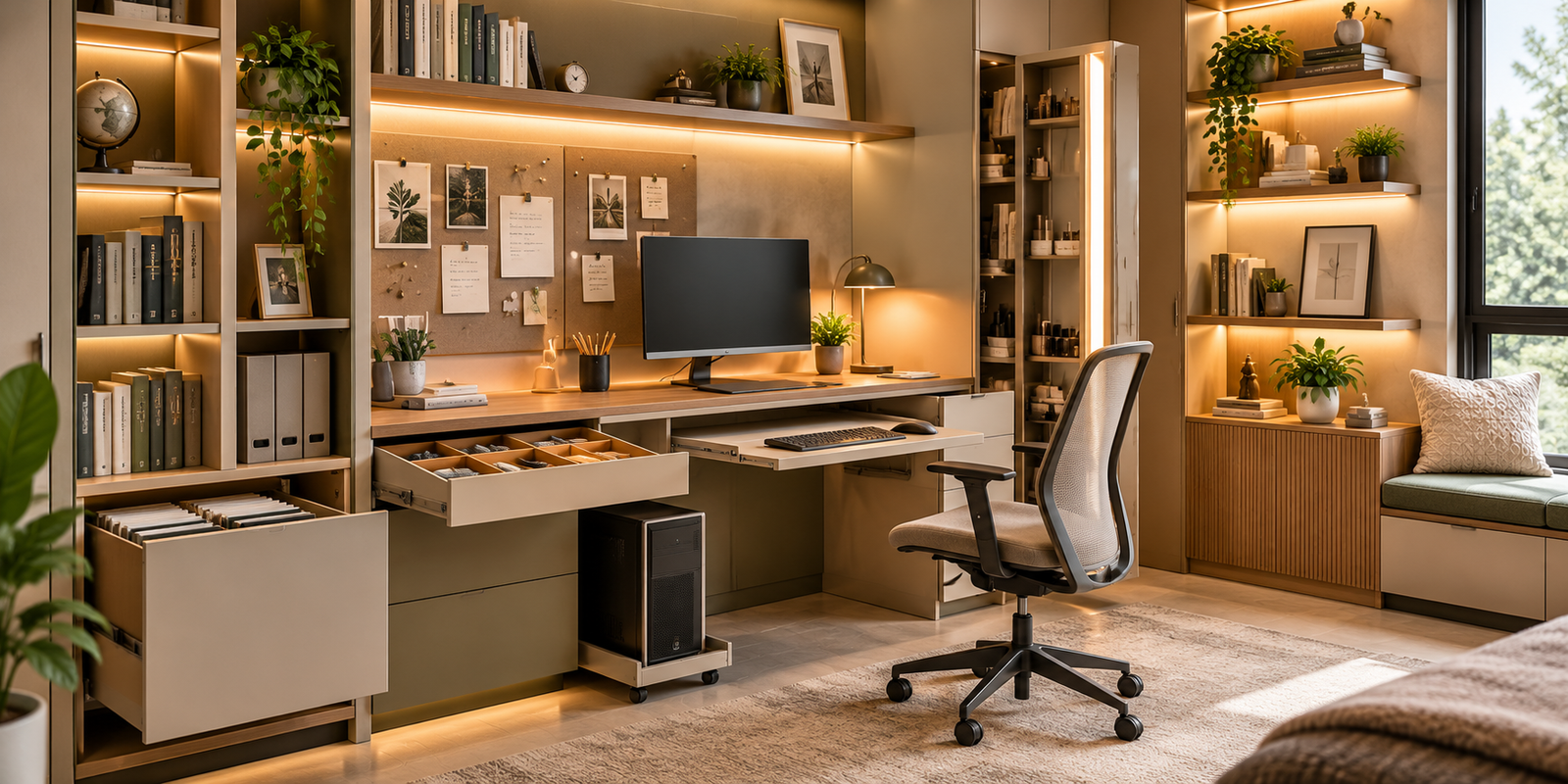
Introduction: Why a Well-Designed Study Space Matters
A study space is more than a desk and a chair. It is an environment where students learn, professionals work remotely, children complete assignments, and individuals pursue personal interests. The way this space is organised can influence comfort, concentration, accessibility, and the ease of completing everyday tasks.
Modern study unit design combines functional furniture, accessible storage, suitable lighting, and carefully arranged technology. A well-planned space helps keep books, stationery, documents, computers, and accessories organised while providing enough room to work comfortably.
However, an attractive study room does not automatically support productive work. Poor desk height, uncomfortable seating, insufficient lighting, tangled cables, and cluttered surfaces can make even a beautifully designed room difficult to use.
A practical study area should reflect the activities performed there. A school student may need space for books, notebooks, and creative projects, while a remote professional may require a computer workstation, document storage, and multiple charging points.
For homeowners planning a dedicated study room or integrating a workspace into an existing bedroom, understanding these design considerations can help create an environment that supports concentration without compromising comfort or interior aesthetics.
1. Identify Your Study Requirements Before Designing the Space
The first step in planning a study unit is understanding who will use it and what activities it must accommodate.
A workspace used primarily for reading and writing will have different requirements from one used for computer-based work, online classes, drawing, or administrative tasks.
Begin by identifying the equipment and belongings that need a permanent place.
These may include:
- Books, notebooks, and stationery
- Files, certificates, and printed documents
- A laptop or desktop computer
- A monitor, keyboard, and mouse
- Chargers, adapters, and power accessories
- Headphones, speakers, and other electronic equipment
- Reference materials and frequently used folders
- Personal items, calendars, and planning boards
Once these requirements are clear, decide which items should remain on the desktop and which can be stored in drawers, cabinets, or shelves.
Frequently used items should be easy to reach without interrupting work. Less frequently accessed materials can be stored in designated cabinets or higher shelves.
It is also important to plan for future needs. A child may eventually require additional books and a computer, while a professional may need more document storage or a larger monitor.
A flexible study unit with adjustable shelving and adaptable storage can accommodate these changes more easily than a design in which every compartment has a fixed purpose.
2. Choose the Right Study Room Layout
The available room dimensions, window positions, electrical points, and surrounding furniture determine how the study unit should be arranged.
Wall-Mounted Study Units
Wall-mounted desks can be useful in compact bedrooms and multipurpose rooms. By reducing the need for bulky supporting furniture, they can create a visually lighter workspace.
However, the wall must be suitable for the mounting system and expected load. Books, monitors, and desktop equipment can be considerably heavier than decorative objects.
The installation should account for the supporting wall structure, mounting hardware, and the distribution of weight across the desk.
Wall-mounted units also benefit from thoughtful cable routing and accessible storage so that the desktop remains clear.
Built-In Study Units
A built-in study unit can integrate a desk, drawers, bookshelves, cabinets, and lighting into a coordinated arrangement.
This option is useful when the workspace must fit a specific wall or complement an existing interior design.
The internal layout should be based on the user’s equipment and working habits. For example, monitor dimensions, keyboard placement, and document storage should be confirmed before the desk and cabinets are manufactured.
Corner Study Units
Corner desks can use space that might otherwise remain underutilised. They may be suitable for bedrooms, compact apartments, and shared study areas.
However, the corner should not restrict comfortable movement or force the user to work at an awkward angle.
Consider the position of the monitor, available writing surface, chair clearance, and access to storage before finalising the design.
Study Units Integrated With Bedrooms
In many homes, a study unit shares space with a bed, wardrobe, or dressing area.
The challenge is to maintain a clear distinction between working and resting activities without making the bedroom feel overcrowded.
A dedicated desk, task lighting, organised storage, and a visually consistent finish can help the workspace feel intentional.
Where possible, position the desk so that opening drawers, moving the chair, and accessing the bed do not interfere with one another.
3. Ergonomics: Design for Comfortable Everyday Work
Ergonomics refers to arranging furniture and equipment around the needs of the person using them. In a study room, this includes desk height, seating, monitor placement, keyboard position, and the amount of space available for movement.
Desk Height and Working Surface
The desk should allow the user to work with relaxed shoulders and comfortable arm positioning.
A desk that is too high may cause the shoulders to rise, while one that is too low can encourage excessive bending. The appropriate height depends on the user’s body dimensions, chair height, and working posture.
The working surface should provide enough space for the equipment and tasks involved. A computer workstation needs room for a monitor, keyboard, mouse, and supporting accessories, while a writing-focused desk benefits from clear space for notebooks and documents.
Chair Selection
A suitable chair should provide stable support and allow the user to sit comfortably for the duration of the activity.
Where possible, choose a chair with an appropriate seat height, supportive backrest, and adjustment options. The feet should be supported, and the user should be able to maintain a relaxed posture.
Children may require furniture sized to their height rather than an adult workstation that they will grow into eventually.
Monitor Placement
The monitor should be positioned to minimise neck strain and unnecessary head movement. Its distance and height depend on screen size, visual requirements, and the user’s seating position.
Avoid placing a monitor where strong window reflections make the screen difficult to read.
Movement and Breaks
Even a well-designed workstation cannot replace regular movement. Encourage changes in posture and periodic breaks during extended periods of sitting.
A functional study room supports comfortable work while allowing users to move freely around the space.
4. Essential Focus Study Accessories for an Organised Workspace
Study unit accessories can improve the way books, documents, technology, and stationery are stored. Their main purpose is to reduce clutter, improve accessibility, and make better use of the available space.
The following eight accessories address different aspects of a modern study environment.
4.1 Soft-Close Drawers: Keeping Stationery and Everyday Essentials Organised
Soft-close drawers are designed to slow down during the final stage of closing, reducing sudden impacts and noise.
In a study unit, they provide convenient storage for pens, pencils, notebooks, chargers, stationery, calculators, and other frequently used items.
A drawer arrangement becomes more useful when its contents are grouped according to function. For example, one drawer can hold writing materials, another can accommodate notebooks and smaller accessories, and a deeper drawer can store larger supplies.
Internal dividers can prevent stationery from becoming mixed together and make it easier to return items to their designated positions.
Drawer depth should reflect the intended use. Shallow drawers are useful for smaller objects, while deeper drawers may be required for files, bulky stationery, or electronic accessories.
Before selecting a drawer system, check the runner quality, load capacity, extension length, and compatibility with the cabinet construction.
Avoid storing heavy books in drawers that are not designed to support their weight. The drawer should remain stable when fully extended, and its movement should not interfere with nearby furniture.
Soft-close mechanisms improve convenience, but regular cleaning and sensible loading remain important for long-term performance.
4.2 Open Bookshelves: Accessible Storage for Books and Reference Materials
Open bookshelves provide visible, easily accessible storage for books, reference materials, magazines, and selected personal objects.
They are particularly useful in study areas because frequently used books can be reached without opening a cabinet. The visible arrangement can also help users identify where individual materials belong.
The shelf dimensions should reflect the types of books being stored. Large textbooks, binders, and reference volumes may require different heights and depths from smaller paperbacks.
Shelf loading is another important consideration. Books can be heavy, so the shelf material, thickness, span, and supporting brackets must be appropriate for the expected weight.
Adjustable shelving can offer greater flexibility as the user’s collection changes.
However, open shelves collect dust and can become visually cluttered when too many unrelated objects are displayed. Organise books by subject, size, or frequency of use, and reserve a limited amount of space for decorative items.
Frequently used books should remain within comfortable reach, while heavier volumes should be placed on suitably supported lower shelves where practical.
Open bookshelves work particularly well when combined with closed cabinets or drawers. This arrangement keeps everyday reference materials visible while concealing items that do not need to remain on display.
4.3 File Storage: Protecting and Organising Important Documents
File storage is essential for students, professionals, and households that regularly handle printed documents.
A dedicated file storage compartment can accommodate folders, certificates, academic records, invoices, manuals, and other papers that need to remain organised and accessible.
Without a designated system, documents often accumulate in piles across the desk, making it difficult to locate a particular file when it is needed.
Before designing file storage, determine the formats and quantities of documents that will be kept. Standard folders, ring binders, and larger project files may require different compartment dimensions.
Vertical file storage can make individual folders easier to identify, while drawers may be suitable for documents that need to remain concealed.
Labelling folders by subject, project, year, or document type can simplify retrieval. Frequently used files should be stored in an accessible position, while archived documents can occupy less frequently accessed compartments.
Consider the protection requirements of important records. Paper documents should be kept away from moisture, direct sunlight, and locations where liquids may spill.
For sensitive documents, use appropriate secure storage rather than relying on an ordinary open shelf.
A well-planned file storage system helps maintain a clear desktop while reducing the time spent searching for information.
4.4 Cable Management: Keeping Wires Organised and Out of the Way
Cable management is particularly important in study units that accommodate computers, monitors, chargers, printers, speakers, and other electronic equipment.
Without a clear cable arrangement, wires can become tangled behind the desk, collect dust, interfere with chair movement, and create tripping or snagging hazards.
A cable management system may include cable trays, routing channels, grommets, clips, or designated compartments that guide cables along a planned route.
The most effective arrangement begins before furniture installation. Identify the equipment that will be used, where each device will sit, and how its cable will reach the appropriate power or connection point.
Leave sufficient cable length for equipment movement and maintenance, but avoid loose loops that can catch on drawers or chair mechanisms.
Do not overcrowd cable trays or bundle cables in a way that prevents appropriate heat dissipation. Follow the equipment manufacturer’s instructions and applicable electrical safety requirements.
Power connections should remain accessible when needed, and damaged cables should be replaced rather than concealed behind furniture.
Where electrical work is required, use a qualified professional. Avoid unsafe extension arrangements or placing power connections where liquids may spill.
A well-designed cable management system improves the appearance of the study unit while making the workspace easier to clean and maintain.
4.5 Keyboard Tray: Creating a More Flexible Computer Workstation
A keyboard tray is a pull-out platform that provides a dedicated position for a computer keyboard and, in some designs, a mouse.
It can help free up the main desktop for documents, notebooks, or other tasks. Depending on its design and the user’s measurements, it may also allow the keyboard to be positioned more comfortably.
The tray’s height, depth, width, and extension mechanism should be considered before installation.
When typing, the user should be able to keep the shoulders relaxed and the wrists in a comfortable, generally neutral position. The tray should not force the arms into an awkward angle or position the keyboard so far away that reaching becomes necessary.
If the mouse is used frequently, ensure that enough surface area remains available for comfortable movement.
Check the tray’s load capacity, runner quality, and stability. The mechanism should extend smoothly and remain secure during normal use.
The tray must also have adequate clearance from the user’s legs. A poorly positioned tray can reduce legroom or interfere with the chair.
Not every workstation needs a keyboard tray. Some users may achieve a more comfortable setup with a sufficiently deep desktop and a suitable keyboard position.
The decision should be based on ergonomics, available space, and working habits rather than treating the accessory as a mandatory feature.
4.6 CPU Storage Unit: Giving Desktop Computer Equipment a Dedicated Place
A CPU storage unit provides a designated location for the desktop computer’s tower, commonly referred to as the CPU in everyday usage.
Depending on the workstation design, the unit may be positioned beneath the desk, beside a cabinet, or within a dedicated storage compartment.
Its main benefit is keeping the computer off the main working surface and organising the surrounding equipment.
However, ventilation is essential. Desktop computers generate heat, and enclosing the tower in an inadequately ventilated compartment can restrict airflow and contribute to overheating.
Before designing the unit, check the computer’s dimensions, manufacturer-recommended ventilation clearances, port locations, and access requirements.
The compartment should allow cables to be connected without sharp bends or excessive tension. It should also provide convenient access for maintenance, cleaning, and equipment upgrades.
Avoid placing the computer directly on a surface that is frequently exposed to dust, spills, or moisture. If the unit is installed near the floor, consider how dust accumulation will be managed.
A sliding platform may improve access to the computer, but its load rating and stability must be suitable for the equipment.
Also consider the placement of monitors, power connections, network equipment, and any external drives.
The most effective CPU storage arrangement balances neat appearance with ventilation, accessibility, and safe cable routing.
4.7 Pin-Up Board: Keeping Notes, Plans, and Ideas Visible
A pin-up board provides a dedicated surface for displaying notes, reminders, schedules, photographs, sketches, and reference material.
It can be especially useful in study areas because important information remains visible without occupying the desktop.
Depending on the design, a pin-up board may use cork, fabric, or another suitable surface that accepts pins or compatible fasteners.
Its location should make the board easy to see from the desk. If it is placed too far away or behind frequently moved equipment, it may become less useful.
Before installation, decide what the board will be used for. A student may need space for a timetable, assignment deadlines, and revision reminders, while a professional may prefer project notes, task lists, or reference diagrams.
A simple organisation system can help prevent the board from becoming cluttered. Divide it into sections for current tasks, upcoming deadlines, and reference information, and remove outdated material regularly.
The board should be large enough for the intended content without overwhelming the surrounding wall.
Consider the material and colour in relation to the study unit’s finish. A neutral board can blend into a minimalist interior, while a contrasting surface can become a visual feature.
Avoid placing pins or sharp fasteners where children can easily reach them if they present a safety concern.
A well-maintained pin-up board can support planning and visual organisation while giving the workspace a more personal character.
4.8 Integrated LED Lighting: Improving Visibility and Workspace Comfort
Integrated LED lighting can illuminate the study surface, bookshelves, and selected storage compartments.
It is particularly useful when the desk is positioned away from a window or when overhead lighting leaves shadows across the working area.
The lighting arrangement should reflect the activities performed at the desk. Reading and writing require clear illumination of the work surface, while shelf lighting helps users locate books and stored materials.
Under-shelf LED lighting can direct light onto the desk without requiring a separate lamp to occupy valuable surface space. However, the placement and diffusion of the light source should be considered to reduce glare.
A dedicated task lamp may still be useful because it can be repositioned according to the user’s needs.
Natural light should also be considered when choosing the desk location. Where possible, position the workstation to reduce direct glare on the monitor while making good use of daylight.
Choose lighting with suitable brightness and colour rendering for the task. Avoid relying on decorative lighting alone for reading or detailed work.
Integrated systems require planning for wiring, switches, drivers, and future maintenance. These details should be resolved before the study unit is manufactured.
When designed appropriately, LED lighting can improve visibility while creating a comfortable, coordinated appearance throughout the study area.
5. Plan Study Room Lighting for Different Activities
Lighting is an important part of study room design because users may switch between reading, writing, computer work, and video calls throughout the day.
A layered approach usually combines general room lighting with focused task lighting.
General Lighting
Ceiling lighting provides overall illumination and helps users move safely around the room.
Its position should reduce dark areas and excessive glare. A single overhead light may not adequately illuminate a desk positioned beneath a shelf or in a corner.
Task Lighting
Task lighting provides more focused illumination for reading, writing, drawing, and other detailed activities.
A desk lamp with an adjustable position can be useful when the workspace serves several purposes. Integrated under-shelf lighting may provide a more permanent alternative.
Avoid directing a bright light straight into the user’s eyes or onto the monitor in a way that creates reflections.
Monitor Glare and Daylight
Natural light can make a workspace more pleasant, but direct sunlight on a screen can reduce visibility.
Consider the position of windows, blinds, curtains, and the monitor before fixing the desk in place.
The aim is to benefit from daylight without creating uncomfortable glare or excessive heat.
Lighting Controls
Separate controls for general and task lighting can make the space easier to adapt throughout the day.
Integrated LED systems should be installed so that drivers and electrical connections can be accessed for maintenance.
6. Storage Planning: Keep the Desktop Clear Without Hiding Everything
An organised study unit balances accessible storage with sufficient clear working space.
The desktop should accommodate the equipment and materials needed for the current task. Frequently used stationery can be kept nearby, while less frequently accessed items can be stored in drawers or cabinets.
Use shelves for reference materials and dedicated file storage for documents that need to be retrieved regularly.
Avoid making every available wall a storage surface. Excessive shelving can make a small study room feel crowded and may leave insufficient space for lighting, wall displays, or visual rest.
It is also helpful to separate different activities. Computer equipment can occupy one zone, while writing materials and books can be arranged in another.
For shared study units, consider assigning separate drawers or labelled storage sections to each user. This can reduce confusion and prevent personal belongings from becoming mixed together.
Review the contents periodically. Remove obsolete papers, recycle unwanted materials appropriately, and return frequently used items to their designated places.
A practical storage arrangement should reduce the effort required to begin work. If the user must clear a crowded desktop every time they sit down, the design may need to be reconsidered.
7. Make a Small Study Room More Functional
A compact study area can still provide an effective workspace when its dimensions and storage are planned carefully.
Wall-mounted desks, vertical shelving, integrated drawers, and suitable cable management can help reduce clutter without sacrificing essential functions.
Use the available wall height thoughtfully, but keep frequently used materials within comfortable reach. Upper shelves are better suited to items that are accessed occasionally.
Choose furniture dimensions according to the user’s requirements rather than simply filling the room with the largest possible desk.
A compact desk needs enough depth for comfortable equipment placement. If a monitor, keyboard, and writing materials cannot fit without crowding, consider a different arrangement or a desk with a suitable extension.
Lighting should be planned early, particularly when the desk is placed in a corner or beneath shelves.
Keep sufficient space for the chair to move and for the user to enter and leave the workstation comfortably.
Where the study unit shares a bedroom, avoid blocking wardrobes, windows, or circulation paths.
A small study room is most effective when every feature has a clear purpose and the user can work comfortably without unnecessary obstacles.
8. Common Study Unit Design Mistakes to Avoid
Choosing a desk that is too small: Insufficient surface area can make computer work, writing, and document handling difficult.
Ignoring ergonomics: Poor desk height, unsuitable seating, and awkward monitor placement can reduce comfort during extended work sessions.
Insufficient lighting: A decorative ceiling light may not provide enough illumination for reading or detailed tasks.
Poor cable management: Unplanned wiring can create clutter, interfere with furniture movement, and make cleaning more difficult.
Overloading bookshelves: Shelves must be designed for the weight and dimensions of the stored books and equipment.
Restricting computer ventilation: A desktop tower should not be enclosed in a compartment that prevents adequate airflow.
Installing an unsuitable keyboard tray: The tray should support comfortable typing without compromising legroom or mouse movement.
Overusing open storage: Too many visible items can make the study area appear cluttered and distracting.
Ignoring future requirements: A workstation may need to accommodate a larger monitor, additional books, or changing study habits over time.
Poor electrical planning: Power points and connections should be coordinated with the furniture layout and installed according to applicable safety requirements.
Forgetting maintenance access: Lighting drivers, cable connections, computer equipment, and drawer mechanisms should remain accessible when servicing is required.
Addressing these points before fabrication can improve usability and reduce the likelihood of expensive modifications later.
9. How to Budget for a Focus Study Unit
The budget for a study unit depends on its dimensions, construction, finish, storage configuration, hardware, and integrated features.
A complete estimate may include the desk structure, drawers, bookshelves, cabinets, file storage, keyboard tray, CPU compartment, cable management, LED lighting, and installation.
Additional costs may arise from electrical work, wall reinforcement, painting, or adjustments to the existing room layout.
Request a detailed quotation that identifies the materials, hardware specifications, lighting components, accessory models, and installation inclusions.
Compare quotations using the same scope of work. A basic desk with a few shelves is not directly comparable to a fully integrated workstation with specialised storage and electrical provisions.
Prioritise features according to actual requirements. A student who primarily reads and writes may benefit most from a comfortable desk, good lighting, and accessible bookshelves. A professional using a desktop computer may need additional investment in ergonomics, cable routing, and equipment storage.
Do not assume that a more elaborate workstation automatically improves productivity. A well-planned, comfortable workspace with appropriate storage can be more useful than one filled with unnecessary accessories.
10. A Checklist Before Finalising Your Study Unit
Before approving the final design, review these points:
- Measure the room and confirm the available wall and floor space.
- Identify the primary users and the activities they will perform.
- Select an appropriate desk size and working height.
- Plan seating, legroom, monitor placement, and chair clearance.
- Estimate the storage required for books, files, stationery, and equipment.
- Confirm shelf dimensions and load capacity.
- Check drawer dimensions and hardware specifications.
- Plan keyboard tray clearance and comfortable mouse positioning.
- Confirm CPU dimensions and manufacturer-recommended ventilation requirements.
- Design cable routes and power access before fabrication.
- Plan general lighting, task lighting, and integrated LED lighting.
- Choose durable, easy-to-maintain materials and finishes.
- Ensure that important electrical connections and mechanisms remain accessible.
- Request a detailed quotation and warranty information.
- Review the final drawings before manufacturing begins.
- Inspect furniture stability, hardware operation, lighting, and installation quality before handover.
This checklist helps ensure that the study unit is designed around practical needs rather than appearance alone.
Conclusion: A Productive Study Space Begins With Thoughtful Planning
A well-designed study unit brings together ergonomic furniture, organised storage, appropriate lighting, and reliable provisions for technology. Its success depends on how comfortably it supports the activities performed there, whether those activities involve studying, reading, writing, or computer-based work.
Accessories such as soft-close drawers, open bookshelves, file storage, cable management, keyboard trays, CPU storage units, pin-up boards, and integrated LED lighting can improve convenience when selected according to the user’s requirements.
Equally important are the less visible details: desk height, seating comfort, monitor positioning, shelf strength, electrical planning, and equipment ventilation.
For homeowners planning a dedicated study room or integrating a workspace into an existing bedroom, these considerations provide a practical foundation for making informed interior design decisions.
At Ocel Metallo, exploring study unit design through these functional principles offers a useful starting point for understanding how thoughtful planning can create a workspace that is organised, comfortable, and adaptable to changing needs.
Frequently Asked Questions
1. What should I consider when designing a study room?
Consider the user’s activities, desk dimensions, seating, lighting, storage requirements, electrical points, equipment placement, and available circulation space.
2. Which accessories are useful for a study unit?
Soft-close drawers, open bookshelves, file storage, cable management systems, keyboard trays, CPU storage units, pin-up boards, and integrated LED lighting can all be useful depending on the workspace.
3. How can I make a small study room more functional?
Use vertical storage, choose appropriately sized furniture, organise cables, maintain clear working surfaces, and provide adequate lighting and chair clearance.
4. Is a keyboard tray necessary?
No. It can help create a comfortable typing position or free up desk space, but a suitably sized desktop may work equally well. The decision should be based on ergonomics and available room.
5. Why is cable management important in a study room?
It keeps wires organised, reduces clutter, improves cleaning access, and helps prevent cables from becoming tangled or interfering with furniture movement.
6. How should a desktop computer be stored in a study unit?
Provide adequate ventilation, suitable support, accessible cable connections, and room for maintenance. Avoid enclosing the computer in a compartment that restricts airflow.
7. What type of lighting is best for a study space?
A combination of general room lighting and focused task lighting is often practical. Position the light sources to illuminate the work surface while minimising glare and screen reflections.
8. How can I keep a study desk organised?
Store stationery in drawers, place frequently used books on accessible shelves, organise documents in labelled files, and route cables through a dedicated management system. Clear the working surface regularly.